 Live Translate
Chrome extension · 20 languages
Watch the world in your own language
Live Translate turns foreign-language audio in a Chrome tab into a translated voice and live captions, about 3 seconds behind the speaker. Watch YouTube, follow Twitch streams or join Google Meet calls in your own language.
- YouTube
- Twitch
- Google Meet
Start translating in three steps
Try it free first. No credit card needed.
Add Live Translate to Chrome
Install the extension from the Chrome Web Store, then pin it from the puzzle-piece menu so its icon stays in the toolbar.
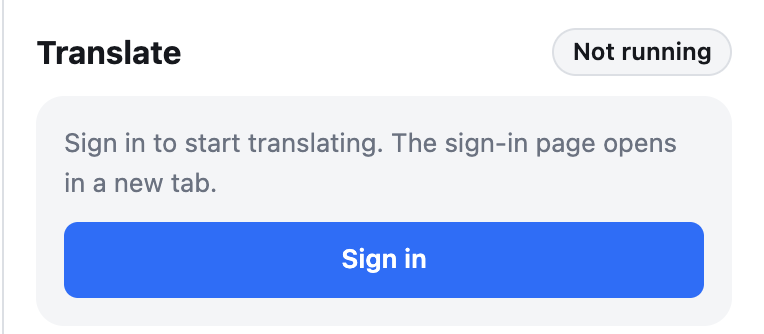
Sign in with Google
Click the Live Translate icon and choose “Sign in”. Sign in in the tab that opens and the extension connects by itself. New accounts start on the Free plan.
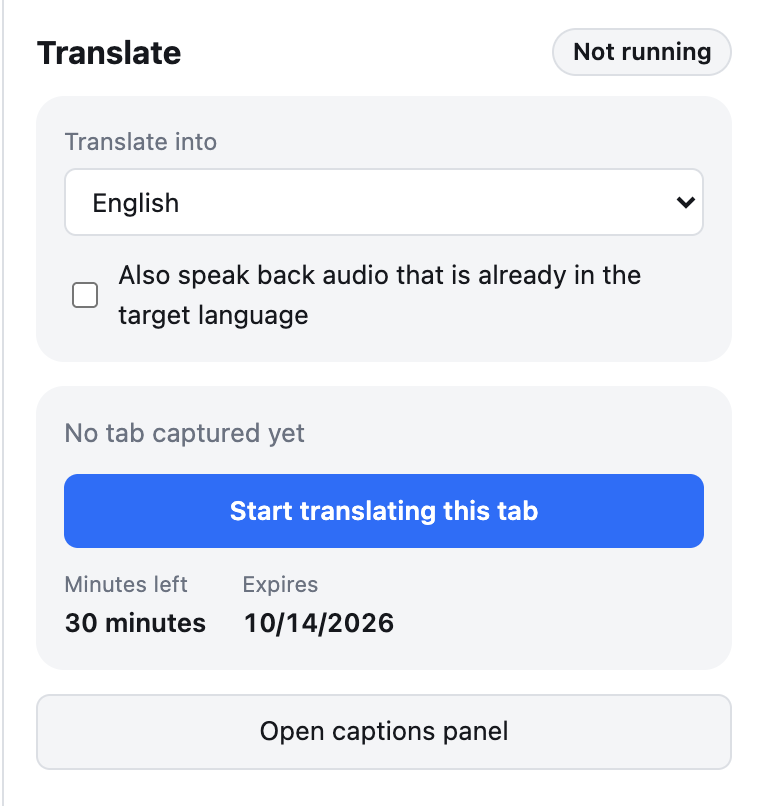
Start translating
Open a video, livestream or call, click the icon again and press “Start translating this tab”.
Made for everything you watch and join
Live Translate works with the audio playing in a Chrome tab, on the sites you already use.
Videos and podcasts
Watch YouTube tutorials, interviews, news and podcasts in another language and hear them in yours, with captions alongside.
Livestreams
Follow a Twitch or YouTube Live stream as it happens. The translated voice runs only about 3 seconds behind the streamer.
Meetings and classes
Understand Google Meet calls, webinars and online classes that run in the browser.
Everything you need to follow along
A voice in your language
Hear the translation spoken aloud while the video or stream plays. The original audio dips whenever the translated voice speaks, and you can adjust both volumes.
Captions in both languages
The original line and its translation sit side by side in the side panel and update while the sentence is still being spoken. Copy them or export them to a text file (.txt).
Hands-free controls
Start or stop with a keyboard shortcut, and use the minibar on the tab to pause or open the captions without leaving the video.
Hours-long streams, uninterrupted
The connection is renewed before the server closes it, so long livestreams and meetings keep going without losing audio.
Good to know before you start
- Only audio playing in a Chrome tab can be translated. The Zoom or Teams desktop apps are out of scope.
- Mishearings at the speech recognition step carry straight into the translation. Double-check important figures.
- Usage is counted while a translation session is running, not while the connection is lost.
Try it on your next video
Sign in with Google and get free translation minutes every month.
No credit card required